The fully configured platform should be able to process images in applications, like, for example Digital Subtraction Angiography, at the full acquisition rate, starting with detector correction all the way to final display, and still leave substantial headroom for new development.
To test this, and to provide some useful functionality from the start, we are developing several examples of image processing modules. Eventually those modules will be made available in a Python library function.
The first ones that we can demonstrate are: the FFT module, convolution with large uniform kernel and (our original) Localized Windowing filter. In the past, for applications like digital angiography, large-kernel operation was a major obstacle in using GPU throughout the entire image processing chain.
The preliminary performance, that we can demonstrate on a middle-grade GPU in processing 1024x1024 images (32-bit floating-point pixels) are:
- Complex FFT - 3 ms
- Convolution with large uniform kernel (201x201 kernel) - 1.3 ms
- Localized Windowing - 0.9 ms
More real-time applications is under developmen: Iterative image denoising (modified TV method), motion compensated temporal filtering, object/device detection and tracking.
Localized Image Windowing
This is our original (patent pending) proposal for image enchancement.
The general idea behind it is to optimize the values of window-level (image brightness) and window-width (image contrast) not globally for the entire image - as it is being done today - but locally, gradually varying those values across the image area. We think that this is superior to other methods as it allows to preserve small image details in both, dark and bright areas. The algorithm leverages of our method for effective computation of large-kernel scan functions on the GPU.
Original image:
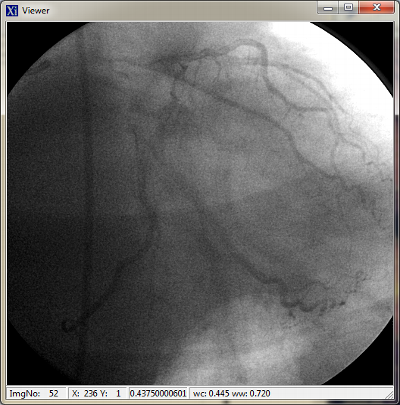
Image after the Localized Windowing is applied:
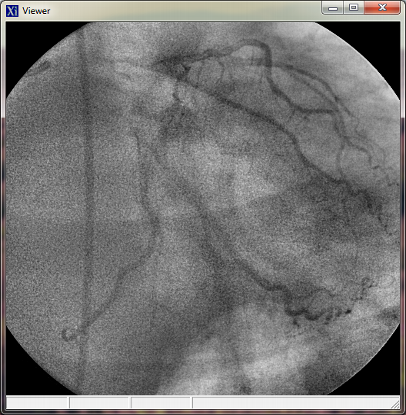
The Localized Windowing algorithm optimizes values of the window center and window width across the image area. The image above was computed with windowing values looking as shown below:
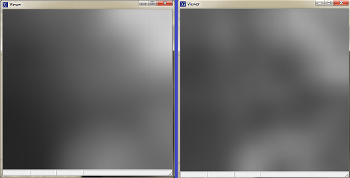
Visualisation of windowing parameters applied to the image.
On the left: window center. On the right: window width.